







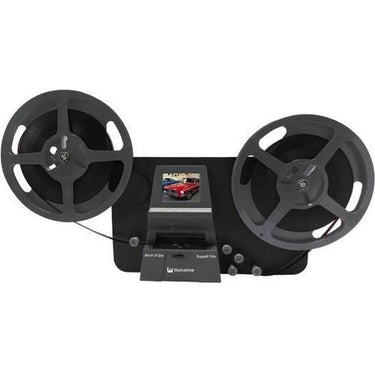


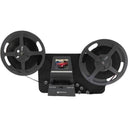


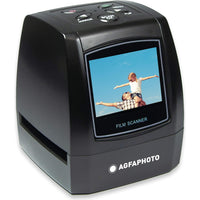
Introducing the Wolverine Reels2Digital Moviemaker-Pro. A very simple-to-use device that will convert your movie reels into digital movies (no sound) with few strokes. It works like a typical projector where you mount up to a 9-inch reel, insert a memory card, press a few buttons and the apparatus will pull the film and scan frame-by-frame to create a digital MP4 movie file that you can play on any computer; you can edit, upload to the internet or burn to DVDs.
The Wolverine Reels2Digital Moviemaker-Pro pays for itself, considering that photo Labs are charging more than a dollar to digitize a single foot of film!
Wolverine Data MovieMaker-PRO 8mm and Super 8 Converter
 Authorised Dealer
Our Price
AUD $916
/
Frequently bought with
Product description
Your old reel-to-reel 8mm and Super 8 films are degrading. Worse, the memories fade, and the film becomes more brittle just sitting in the box. Convert your Film into digital now before the memories are lost forever!
INCLUDED
- MovieMaker-PRO
- 5" reel
- 110-240VAC Power Adapter
- USB cable
- TV-Out RCA Cable
- Super 8 Reels Adapter
- User Manual
Specifications:
- Image sensor: 3.53 Mega pixels (2304H x 1536V) 1/3" CMOS sensor
- Display: Color 2.4" TFT LCD
- Exposure control: Auto/Manual (-2.0 to 2.0)
- White balance: Auto
- Resolution 1080P
- Frame rate: 20 frames
- Scan method: Video
- Film type: 8 mm and Super 8 roll film up to 9" reels
- File Output format: MP4
- TV-OUT type: NTSC
- Built-in memory: None
- External memory: SD/SDHC memory card up to 32 GB
- Power Supply: DC 12V
- Interface: USB 2.0
- Language: English and Japanese
- Support system: Windows 7 and higher/Mac 10.7.3 and higher
- Dimension: L269xW166xH114 mm/10.6x6.5x4.5 in
- Weight: 1410 g/3.1 lb
| Wolverine Data Film2Digital MovieMaker-PRO Specifications | |
|---|---|
| Product Overview | |
| Product Name | Wolverine Data Film2Digital MovieMaker-PRO 8mm and Super 8 Converter |
| Model | MovieMaker-PRO / MM100-PRO |
| Product Type | Standalone 8mm and Super 8 film-to-digital converter |
| Primary Function | Converts 8mm and Super 8 movie film reels into digital MP4 video files |
| Standalone Operation | Yes, no computer is required while scanning |
| Software Required to Scan | No |
| Film Compatibility | |
| Supported Film Types | Regular 8mm / Standard 8 and Super 8 roll film |
| Film Type Selection | Physical film selection lever: left for 8mm, right for Super 8 |
| 8mm Sprocket Type | Rectangular sprocket hole |
| Super 8 Sprocket Type | Square sprocket hole |
| Maximum Reel Size | Up to 9" / 22.9 cm reels |
| 3" Reel Support | Yes |
| 5" Reel Support | Yes |
| 7" Reel Support | Yes |
| 9" Reel Support | Yes |
| 16mm Film Support | No |
| Photo / Slide / Still Negative Scanning | No |
| Positive Film Support | Yes |
| Negative Film Support | Yes |
| Scanning & Image Sensor | |
| Scan Method | Frame-by-frame video scanning |
| Image Sensor | 3.53 megapixel 1/3" CMOS sensor |
| Sensor Pixel Resolution | 2304 × 1536 pixels |
| Colour Depth | 24-bit colour |
| White Balance | Automatic |
| Real-Time Scan Speed | No, scanning is slower than real-time because each frame is captured individually |
| Film Counter | Yes, on-screen counter increases after each recording stop |
| Video Output | |
| Output Resolution | 1080p Full HD |
| Output Frame Rate | 20 frames per second |
| Video File Format | MP4 / MPEG-4 |
| Audio Recording | No, video only |
| Magnetic Sound Film Support | No |
| Optical Sound Film Support | No |
| Sound Synchronisation | Not applicable; no sound is captured |
| Menu Pages & On-Device Software Options | |
| Menu Page 1 | Record, Playback, Rewind, USB |
| Menu Page 2 | Exposure, Sharpness |
| Menu Page 3 | Frame ADJ, Language, Format |
| Menu Page 4 | Default Setting, Film Type, Version |
| Navigation Buttons | Power, Up/Down arrows, Enter/Start/Stop, Menu |
| Menu Button Function | Go back to menu selection; press twice to go to menu mode or record mode |
| Enter / Start / Stop Button Function | Start or stop the highlighted item or selected function |
| Exposure, Sharpness & Image Adjustment Options | |
| Exposure Control | Automatic or manual brightness adjustment |
| Exposure Range | -2.0 to +2.0 EV |
| Exposure Default | 0.0 |
| Exposure Example Options | -0.5, 0, +0.5 shown in menu examples; full adjustment range is -2.0 to +2.0 |
| Negative Exposure Effect | Darker image |
| Positive Exposure Effect | Brighter image |
| Sharpness Options | Low, Medium, High |
| Sharpness Default | Medium |
| Frame Adjustment | Yes, frame centre and zoom can be adjusted before recording |
| Frame ADJ X Option | Shifts frame centre left or right |
| Frame ADJ Y Option | Shifts frame centre up or down |
| Frame ADJ W Option | Zooms in or zooms out |
| Adjustment Timing | Exposure, sharpness, frame adjustment and other non-default settings should be changed before starting recording |
| Record Mode | |
| Record Function | Starts frame-by-frame capture to MP4 |
| Start Recording | Press Enter / Start / Stop after selecting Record |
| Stop Recording | Press Enter / Start / Stop during recording |
| Recording Indicator | Red dot blinks while recording is in process |
| File Counter Behaviour | Counter increases by one after each recording stop |
| Playback Mode | |
| On-Device Playback | Yes |
| Playback File Selection | Use Up/Down arrows to select a recorded MP4 file |
| Pause Playback | Yes, press Enter/Stop to pause playback |
| Delete File on Device | Yes, press Menu once in Playback to enter Edit mode, then choose Delete |
| Playback Return Option | Return option goes back to Playback |
| No File Message | If the card has no compatible MP4 movie files in the correct folder, the viewer displays “No File” |
| Mac Hidden File Note | Mac computers may create hidden files on the SD card; these hidden files are not playable by the unit |
| USB Mode & File Transfer | |
| USB Interface | USB 2.0 |
| USB Mode | External drive / removable storage mode for accessing files on the SD/SDHC card |
| Computer Drive Name | May appear as “NO NAME” or similar depending on the computer |
| File Folder Location | FilmScanner / MOVIE |
| USB Driver Required | No dedicated driver required for normal file transfer |
| USB Live View to Computer | No, USB is for file transfer from the SD/SDHC card, not webcam-style live capture |
| USB Live Recording to Computer | No, recording is saved to the SD/SDHC card |
| USB-C | No |
| TV Output & Live Viewing | |
| Built-in Display | 2.4" colour TFT LCD |
| TV Output | Yes, composite TV-out using included TV-out cable |
| TV Output Standard | NTSC / PAL |
| TV Connection Type | Yellow composite video input |
| HDMI Output | No |
| Live View on TV | Yes, the TV can show the MovieMaker-PRO viewer screen when connected via TV-out |
| Built-in Screen During TV-Out | The unit’s viewer screen turns dark when TV-out is connected |
| Use as a Projector | No, it is a scanner/digitizer rather than a traditional projector |
| Storage & Memory Cards | |
| Memory Card Type | SD / SDHC memory card |
| Maximum Card Capacity | 32 GB maximum |
| SDXC Card Support | No official support; 64 GB or larger cards may cause a “Card error” message |
| Internal Memory | None |
| Memory Card Included | No, a compatible SD/SDHC card is required separately |
| Card Lock Position | SD/SDHC card must be unlocked before use |
| Card Removal Behaviour | Push card inward to release; pulling directly may damage the card reader |
| Automatic Power-Off During Card Eject | The unit powers off automatically if the SD/SDHC card is mounted or dismounted |
| Format Function | Yes, menu option can erase all files on the inserted SD/SDHC card |
| Rewind Function | |
| Rewind Support | Yes |
| Rewind Setup | Film is removed from the light table and reels are swapped before rewinding |
| Take-Up Reel Position for Rewind | Empty take-up reel goes on the right side |
| Rewind Start / Stop | Press Enter to start or stop rewinding |
| Language, Reset, Version & Format Options | |
| Languages | English and Japanese |
| Default Setting Option | Yes, resets all values to manufacturing defaults, including 0.0 exposure and medium sharpness |
| Format Option | Yes / No selection to erase all files on the inserted SD/SDHC card |
| Film Type Menu Option | Positive or Negative film |
| Version Display | Yes, version menu option is included |
| Computer Operating System Compatibility | |
| Windows XP | Yes |
| Windows Vista | Yes |
| Windows 7 | Yes |
| Windows 8 | Yes |
| Windows 10 | Yes |
| Windows 11 | Generally yes for file transfer as USB removable storage |
| Mac OS X 10.7.3 | Yes |
| macOS | Yes for file transfer; modern macOS versions should read the SD card or USB storage normally |
| Linux | Generally accessible as removable storage for file transfer |
| Computer Needed for Playback Editing | Optional, but useful for trimming, colour correction, stabilising, speed correction and sharing |
| Editing Software Included | No |
| Power & Physical Details | |
| Power Source | External AC adapter |
| Power Requirement | 12V DC |
| Dimensions | 269 × 166 × 114 mm |
| Dimensions in Inches | 10.6 × 6.5 × 4.5" |
| Alternate Listed Dimensions | Approx. 12.01" W × 7.01" H × 2.99" D, depending on source measurement method |
| Weight | Approx. 1.4 kg / 3.1 lb |
| Package Weight | Approx. 4.88 lb |
| Package Dimensions | Approx. 13.75 × 9 × 6.5" |
| Included Accessories | |
| MovieMaker-PRO Unit | Included |
| Power Adapter | Included, 12V / 1.5A |
| USB Cable | Included |
| TV-Out Cable | Included |
| 5" Reel | Included, 8 mm diameter centre hole |
| Left Reel Adapter | Included, red / no-fin adapter |
| Right Reel Adapter | Included, grey / finned adapter |
| Cleaning Brush | Included |
| User Manual | Included |
| SD / SDHC Card | Not normally included |
| Film Handling & Preparation | |
| Film Cleaning Required | Recommended before scanning; use lint-free cloth and anti-static film cleaner |
| Automatic Film Cleaning | No |
| Light Table Cleaning | Yes, open film door and use the included brush to clean the light table |
| Film Condition Requirement | Film should be clean, flexible and free of severe damage before scanning |
| Damaged Sprocket Holes | May cause jitter, tracking issues, jams or poor scan results |
| Bad Splices | May catch in the film path and should be repaired before scanning |
| Brittle or Warped Film | May jam, tear or scan poorly |
| Tightly Wound Film | May benefit from rewinding back and forth before scanning to reduce jitter |
| Film Placement | Film sprocket holes should be positioned at the top and placed under all three white tabs |
| Incorrect Film Placement | Can cause jittery recorded video |
| Common Questions | |
| Does it digitise video and sound? | No, it digitises video only |
| Does it come with a memory card? | No, a compatible SD/SDHC card up to 32 GB is required separately |
| How long does it take to scan a reel? | It is slower than real-time; larger reels can take several hours depending on reel size and film condition |
| Can it be used as a projector? | No, it is designed to digitise film rather than project reels for live viewing |
| Can it live view on a TV? | Yes, the viewer screen can be shown on a TV using the TV-out connection |
| Can it live view through USB? | No, USB is for file transfer, not live video capture |
| Can it record directly to a computer? | No, recordings are saved to the inserted SD/SDHC card |
| Is it compatible with Windows and Apple computers? | Yes, for file transfer |
| Can it correct playback speed? | No built-in speed conversion beyond its 20fps output; speed changes can be done later in editing software |
| Can it restore scratched or faded film? | No professional restoration is built in; exposure, sharpness and frame position can be adjusted, but scratches, fading and damage remain visible |
Customer Reviews
5.0 Based on 6 Reviews
Customer Photos

- Reviews
- Questions
Filter Reviews:
PS
02/01/2025
Paolo S.
 New Zealand
Easy to use, well made
I've used it to convert super8 and 8mm I had from the 60s and 70s, and it went through 30 reels without any issue. It's worth the price and I'd recommend it to whoever is interested in converting super8 and 8mm reels to mp4.
PA
12/08/2024
Philip A.
New ZealandWolverine Data MovieMaker-PRO
Found a box of 50+ year old 8mm home movies so bought this to digitise them. Overall the machine is great. It is a bit fiddly loading the film but with a bit of practice it is quite easy. The quality of the output is dependent on the movie quality which in my case was not brilliant but the memories are the important thing. And the price is extremely competitive compared to a professional transfer service. Overall impressions five stars!
HD
25/10/2023
Hugo D.
New ZealandWolverine Data MovieMaker-PRO 8mm and Super 8 Converter
The item arrived within 2 days on my doorstep. Well done NZ Post. This film scanner is easy to use and creates quality output. The resulting video shows a bit of jitter which can easily be removed by running it through a Stabilizer, eg the one available in VideoPad Video Editor.
RP
19/03/2022
Roland P.
New ZealandMy view of the Wolverine MovieMaker Pro
What a superb machine. I had bought another brand of 1080 8mm film digitizer and while the first 7 inch reel of film was scanned with no problems, but the machine developed some sort of fault and is to be returned for replacement. But I did not want to be waiting, so I purchased the Wolverine MovieMaker Pro, which was available in my own country. Boy am I pleased I did, it arrived in just 3 days and I have now scanned over 10 reels of 400 ft film with not a problem. It has run faultlessly. I totally recommend this scanner as the one to purchase. Regards, Roland. Nelson, NZ.


