








ORDER NOW
ENJOY NOW
PAY LATER
Pay it in four interest-free payments
No new cards, you can use your existing bank card
No long forms, online approval
Pay every 2 weeks, enjoy your purchase right away
All you need to apply is to have a debit or credit card, to be over 18 years of age, and to be a resident of New Zealand or Australia
Late fees and additional eligibility criteria apply. The first payment may be due at the time of purchase. For complete terms visit https://www.afterpay.com/terms

Contact me when stock is available
ERROR
Estimated time of arrival:
2000
39849
Shipping calculated at checkout
When will I receive it?
Pickups and Delivery
In-store pickup
We don't have this item in our store right now, please allow for it to be transferred to our retail store.
If you come to pick up your order please bring photo ID, if someone else is picking it up on your behalf please contact us prior to pickup.
Delivery estimates
Once your order has been picked up by the courier please allow 2 working days for North Island addresses, for the South Island allow 3 working days. Rural deliveries and extra-large items may take several additional days.
Shipping costs
Shipping costs are automatically calculated during checkout. The price of shipping varies based on the delivery location. Select items may be be eligible for free shipping.
Delivery of oversize items
Oversize items such as very large telescopes may only be available via pickup from a depot or delivered to a business address. For more infomation click here. Due to less frequent collection of oversize items delivery may take 2 to 4 additional days.
Security
To ensure the safe delivery of your order we require a signature with all parcels. Some exceptions may be made if you give the courier company authority to leave parcels at your preferred address.
About this product
BACKYARD WEATHER
- Unique Forecast Icons
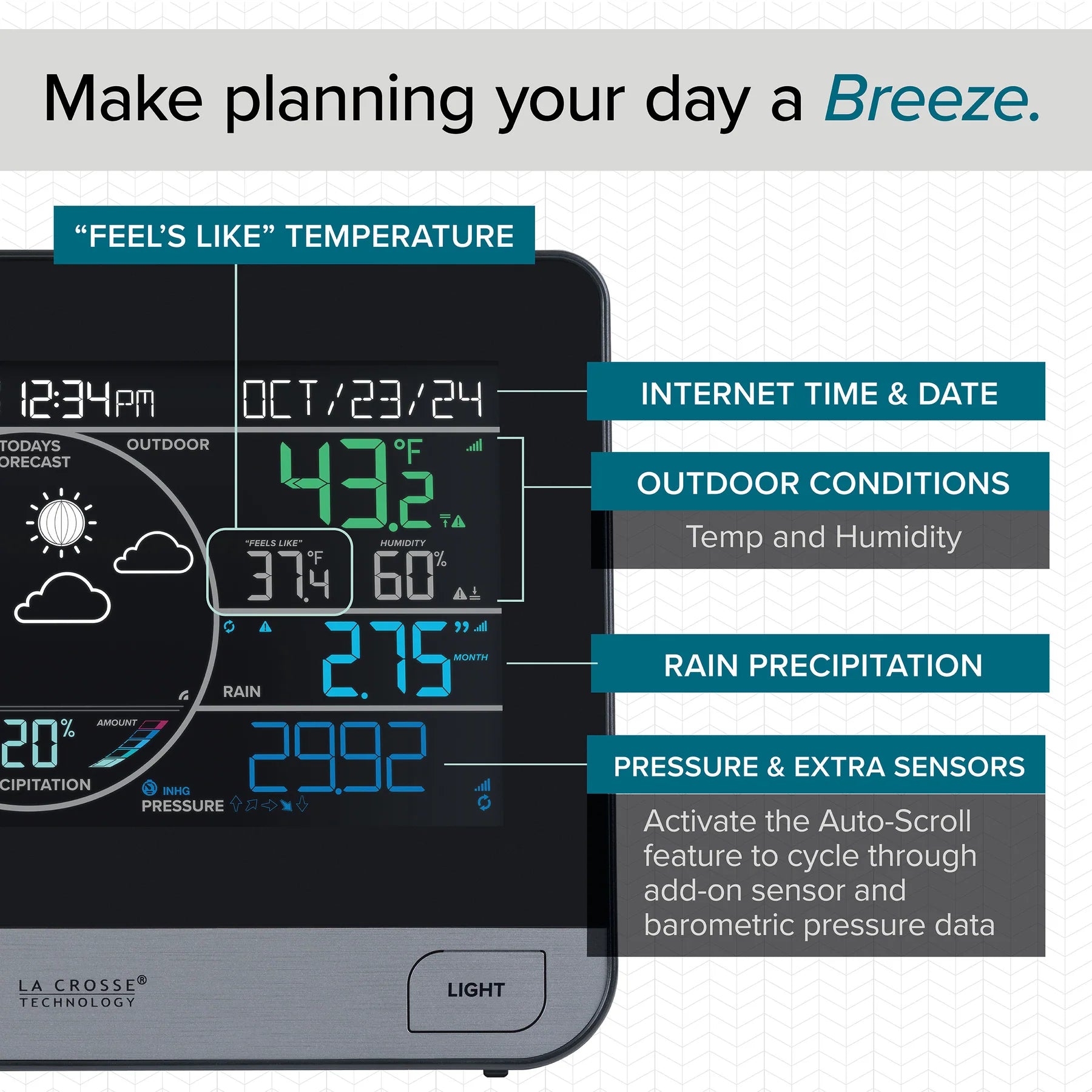
- Barometric Pressure (InHg or hPa)
- Custom Pressure Setting
- Pressure Tendency Arrows
- Outdoor Temperature (°F or °C)
- Outdoor Humidity (%RH)
- “Feels Like” Temperature (Heat Index/Wind Chill)
- Custom Alerts (Temp/Humidity)
- Records with Time & Date Stamps
- Dew Point
- Moon Phase (Shown from 7pm to 6:59am)
WIND SPEED + DIRECTION
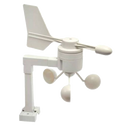
- Included Outdoor Breeze Pro 4.0 Sensor
- Easy to Install with Multiple Configurations
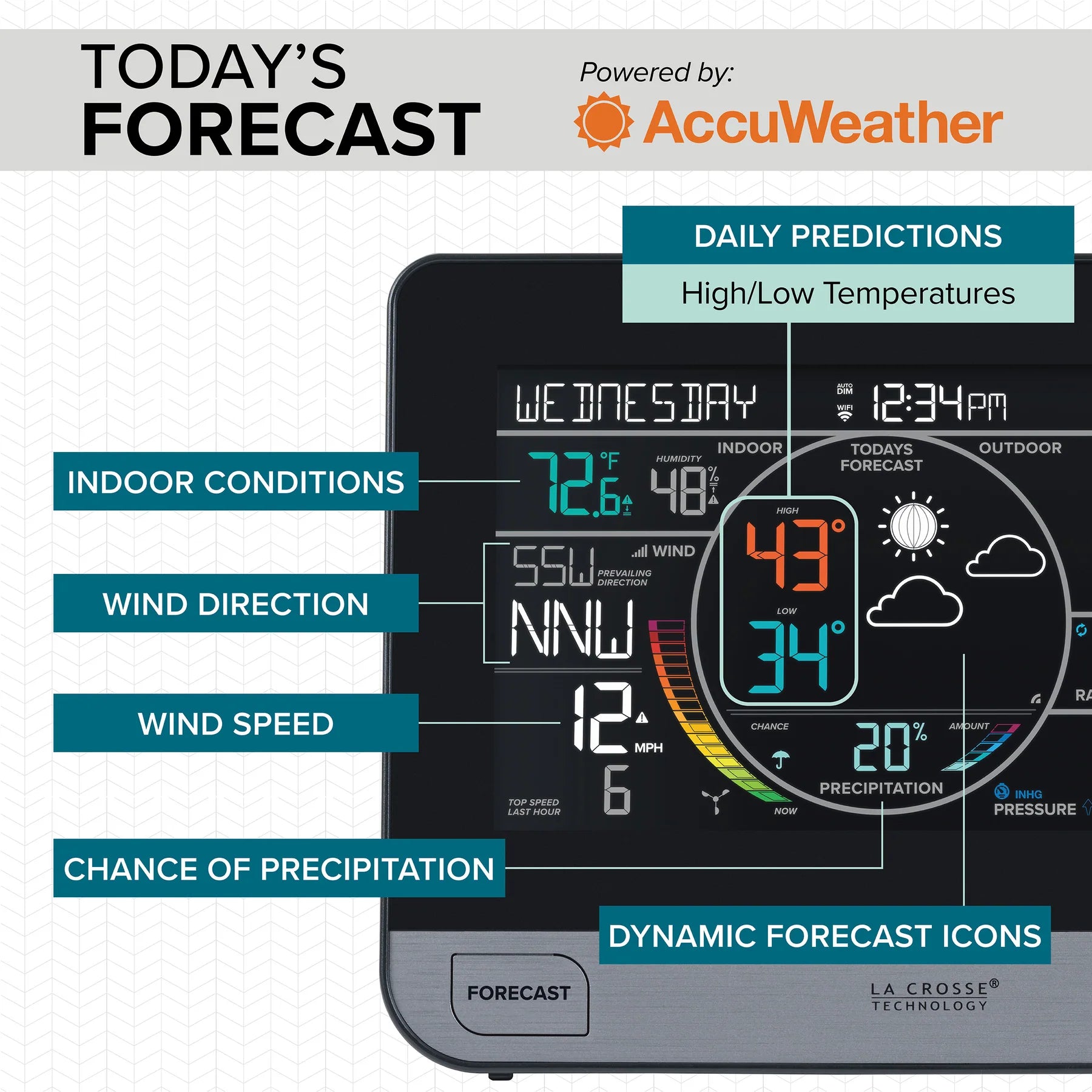
- Current & Top Wind Speeds
- Dynamic Multi-Color Wind Speed Graph
- Animated Wind Speed Cups
- Custom Wind Speed Alert
- Speed Records with Time & Date Stamps
- 24-Hour
- 7-Day
- 1-Month
- 1-Year
- Current & Prevailing Wind Direction
- Cardinal or Degrees of Wind Direction Display
RAINFALL DATA
- Included Wireless Rain Gauge
- Rainfall Totals (IN or MM)
- Rainfall History
- 1 Hour
- 24 Hours
- 7 Days
- 1 Month (+ Past 11 Monthly Totals)
- 1 Year
- Total (Since Startup or Last Reset)
- Rainfall History Auto-Scroll
- Custom 24-Hour Rainfall Alert
- Days Since Last Rain Feature
HOME CONDITIONS
- Indoor Temperature (°F or °C)
- Indoor Humidity (%RH)
- Records with Time & Date Stamps
Custom Alerts (Temp/Humidity)
DISPLAY FEATURES
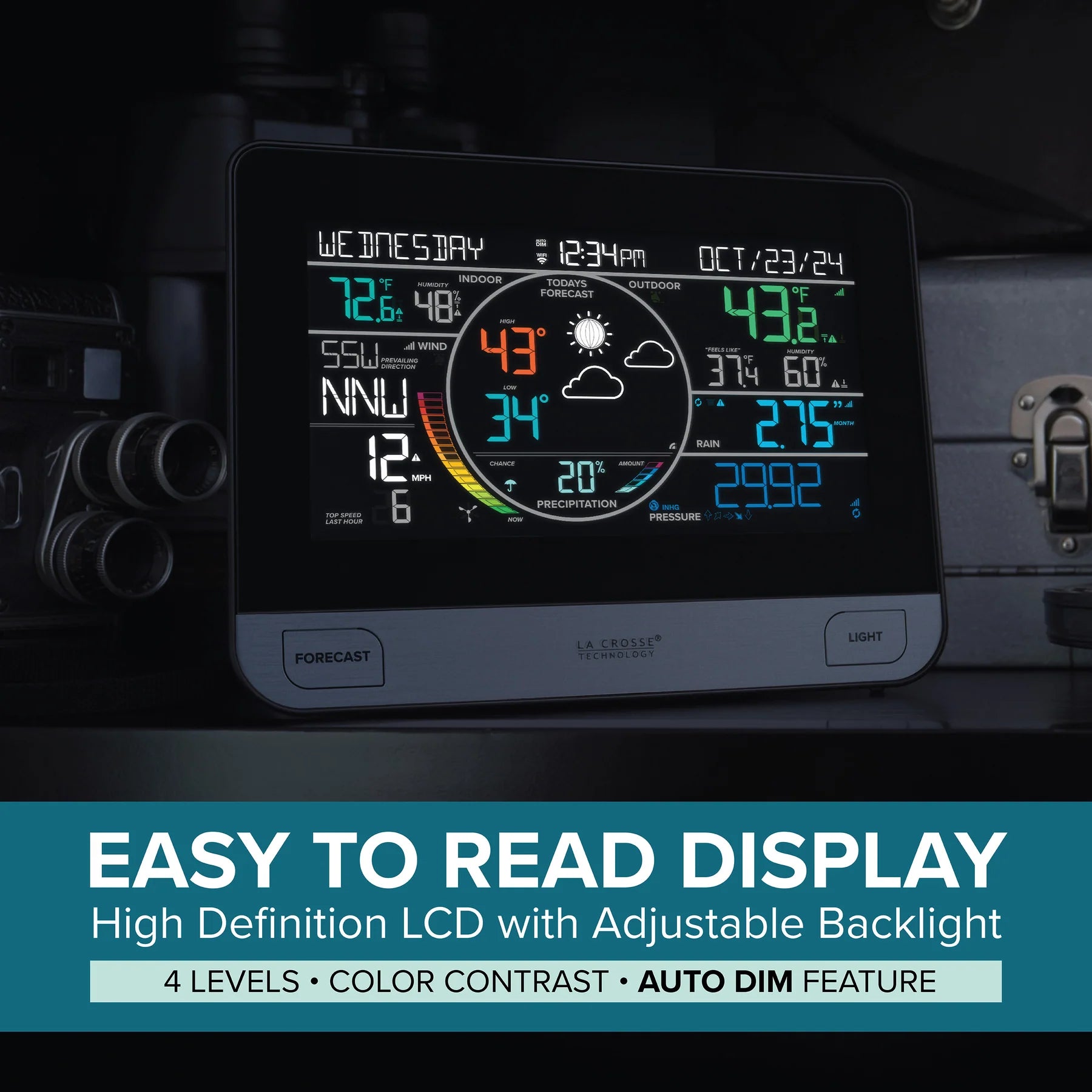
- High-Definition Color Display
- Adjustable LCD Brightness (5 Levels)
- Programmable Auto-Dim Settings
- Time (12/24-Hour Format)
- Calendar with Full Weekday & Date
- Wi-Fi, Sensor Connection, and Low Battery Indicators
- Language Options: English, Spanish, French, and German (For Menus & Calendar)
- Optional Decimal Values for Temperature
- Ability to Replace Outdoor Temp & Humidity Data with Separate Sensor
- Ability to Replace Wind Data with Separate Sensor
- Compatible with Add-On Sensors
- Add-On Sensor Auto-Scroll (4 Sensors + Pressure)
- Quick Setup with Easy-to-Use Controls
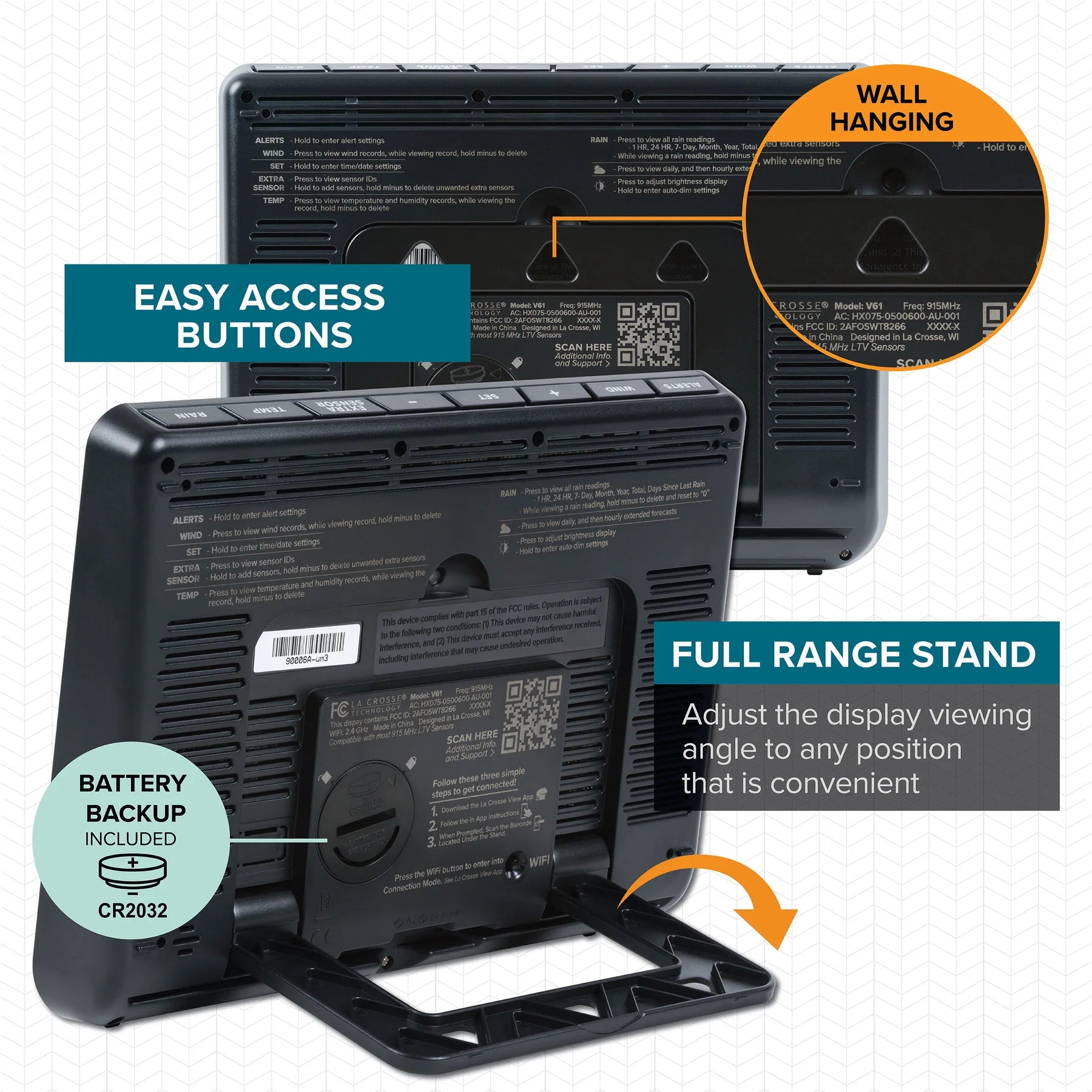
- Built-in Adjustable Full-Range Stand
- Integrated Wall Hanging Holes
- Premium Case – Designed for durability and long-term use
- Button functions are conveniently printed on the back with a QR code for support
ADDITIONAL BENEFITS
- Printed Setup Guide Included
- Access to U.S. Based Tech Support
- 1-Year Warranty
- 30-Day Money Back Guarantee on LaCrosseTechnology.com Purchases
ENHANCED WI-FI CONNECTED FEATURES
- AccuWeather Forecast Information
- Current Forecast
- Future 6-Day & 12-Hour Forecasts
- Additional Forecast Icons
- Daily High & Low Temperatures
- Chance of Precipitation
- Amount of Precipitation Graph
- Internet Time & Date (Update Automatically) · Access to Custom Data Streams (Learn More)
LA CROSSE VIEW APP
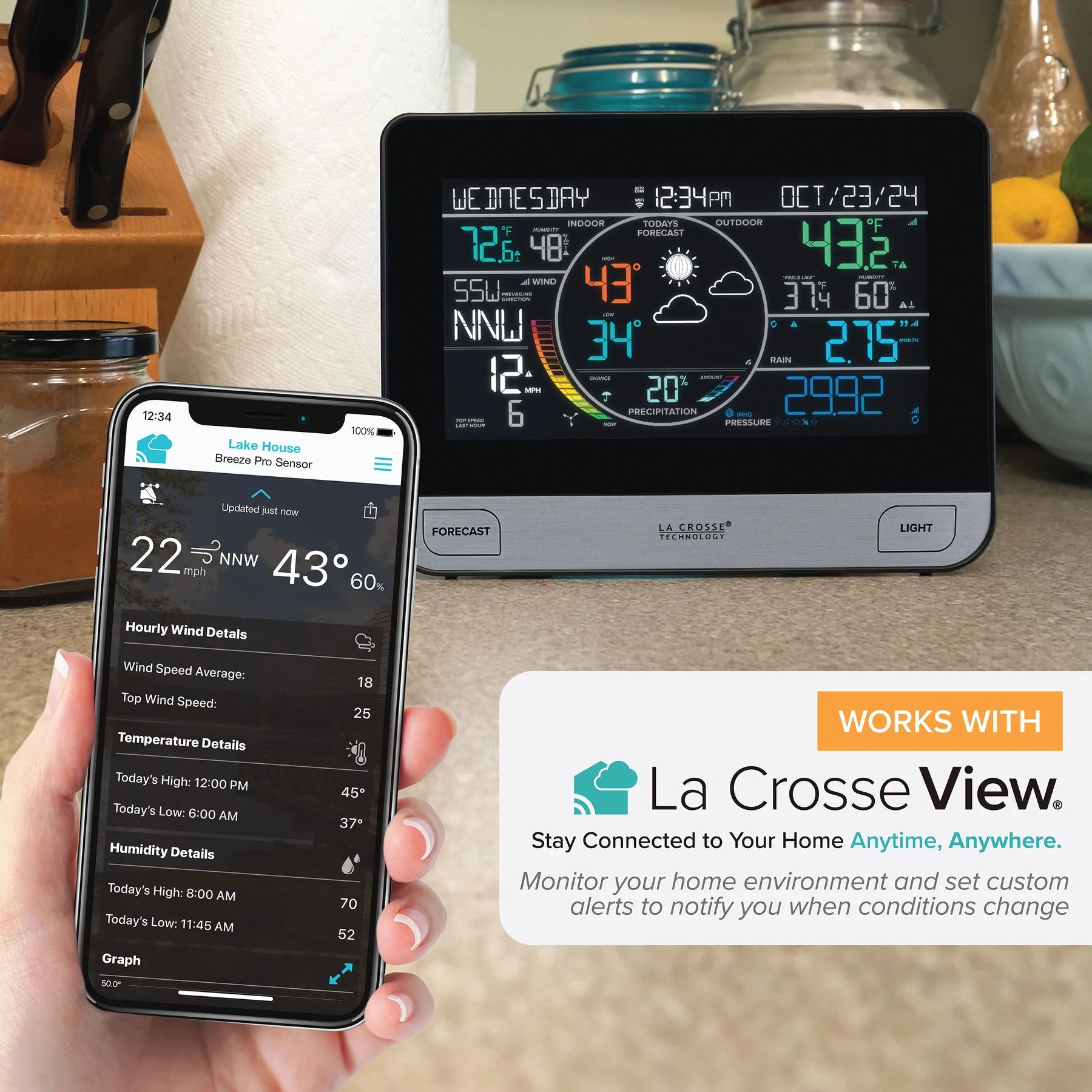
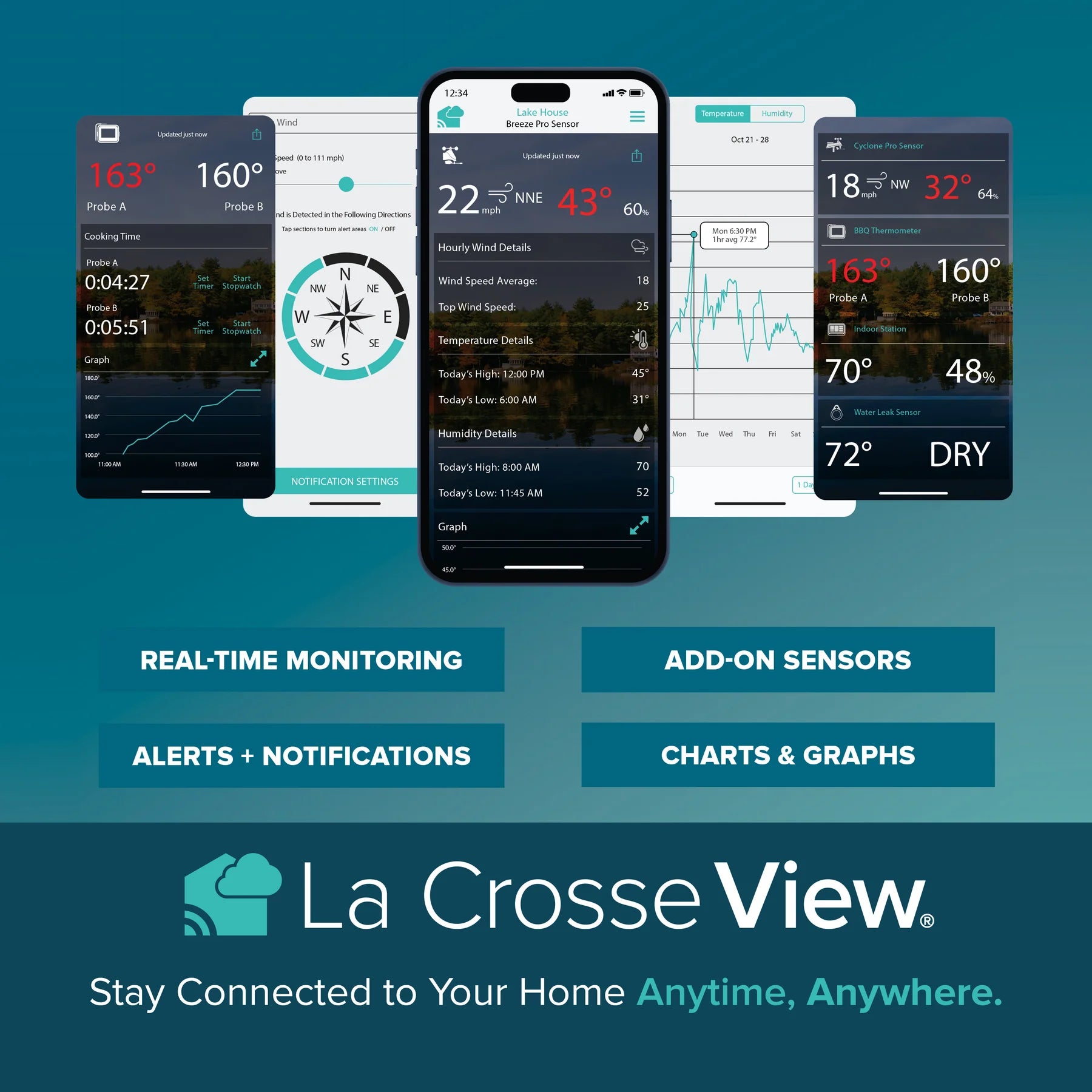
- Remotely Monitor Display and Sensor Data Anywhere on the Go
- Set Free Custom Push Notification Alerts
- Track an Unlimited Number of Devices
- Easily Share Devices with Family and Friends
- Track Device History with Detailed Graphs & Data Exports · Improve Your App Features with an Upgraded Subscription Plan
ADD-ON SENSORS
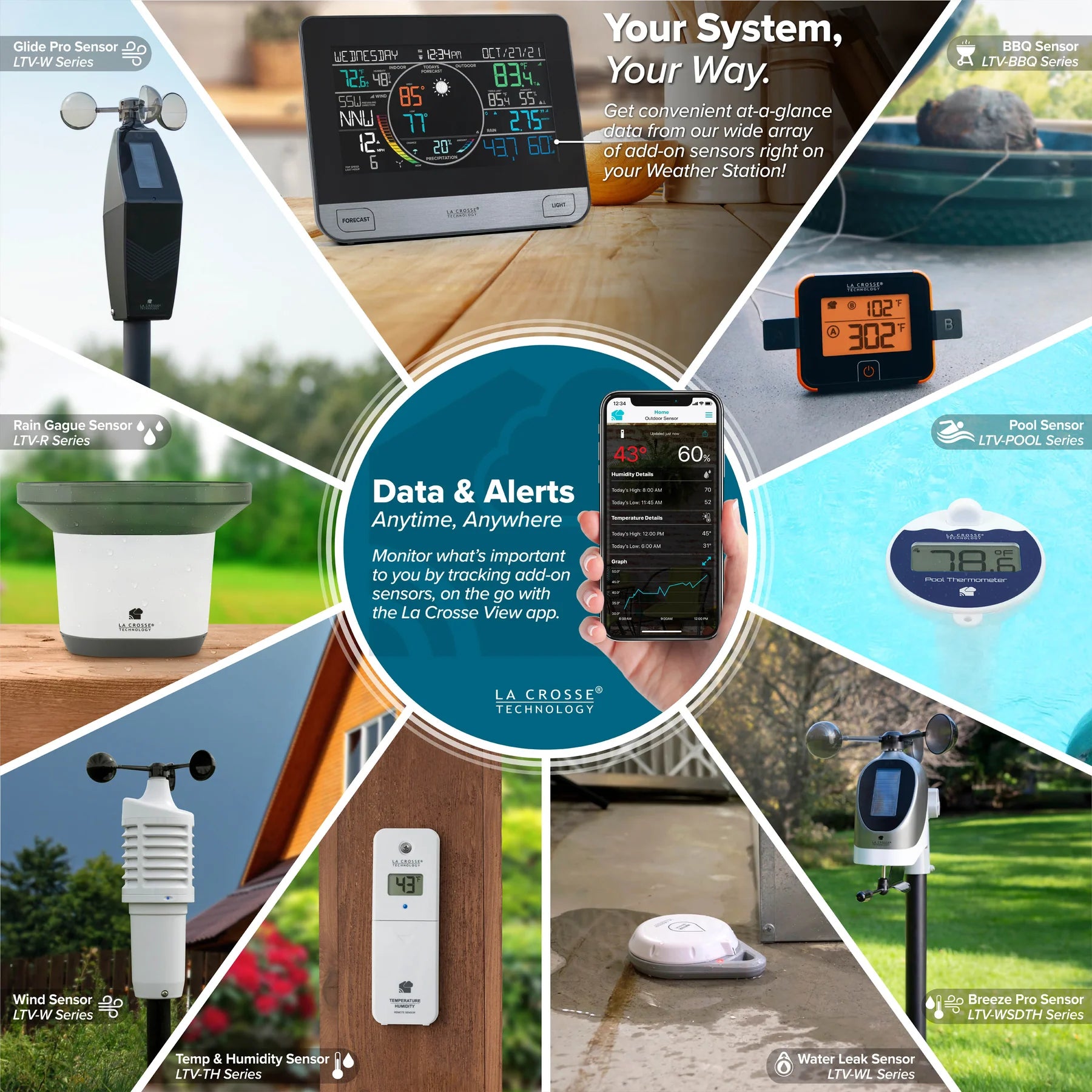
Monitor additional weather info and sensitive areas around your home for complete peace of mind. Up to four add-on sensors can be shown on the V61 weather station display, and additional sensors can be passed through to your La Crosse View app. Everyday use cases include:
- Rain - Display 24-hour rainfall from a secondary location and view full history in the app
- Wind - View current wind speed and direction from a second location on your property
- Temperature & Humidity - Monitor your backyard, nursery, garage, attic, basement, humidor, and more
- Temperature Probe - Ideal for refrigerators, freezers, aquariums, terrariums, greenhouses, and more
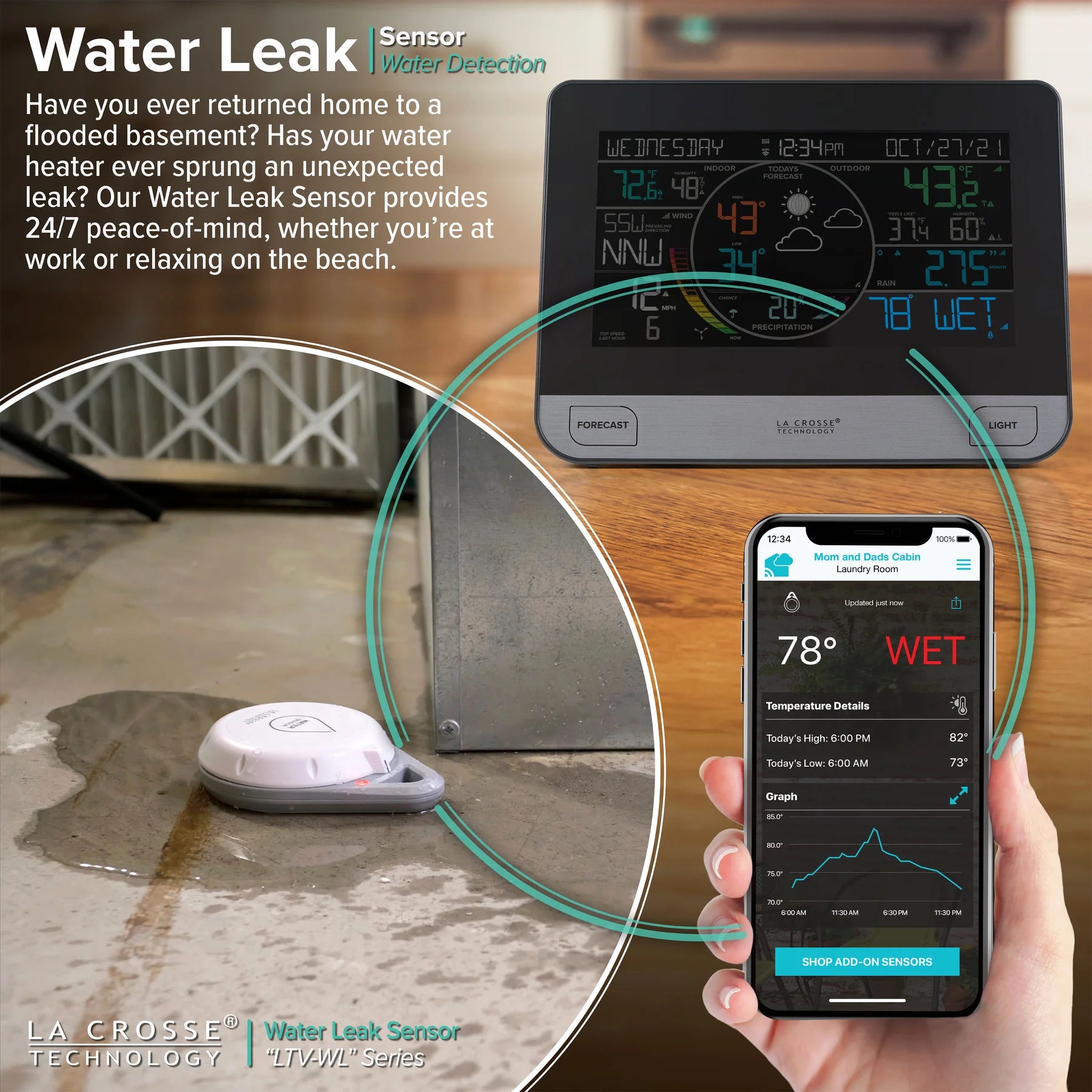
- Water Leak - Put near the washing machine, sink, or water heater to know right when leaks happen
- Pools - Floating sensor provides water temp at the source, in the app, and on your in-home display
- BBQs - Useful during long roasts or smoking meats to make sure they are at just the right temp
STATION SPECS (V61)
- Indoor Temp Range: 32°F to 122°F (0°C to 50°C)
- Indoor Humidity Range: 10 to 99% RH
- Relative Pressure Range: 23.62 to 32.48 InHg (800 to 1100 hPa)
- LCD Brightness: 4 Intensity Levels + OFF (Programmable Auto-Dim Option)
- Language Options: English, Spanish, French, and German
- Power Requirement: 5V AC Adapter (Included & Required)
- Battery Backup: 1 “CR2032” Coin Cell Battery (Included)
- Battery Life: 24+ Months with Power Cord Use
- Station Dimensions: 8.30 in L x 1.13 in W x 6.33 in H (21.09cm L x 2.88cm W x 16.09cm H)
Wi-Fi & MOBILE REQUIREMENTS
- Broadcast Frequency: 2.4GHz (802.11 b/g/n)
- Network Name/Password: Must Not Exceed 45 Characters
- Network Speed: Must Be Greater Than 1Mbps
- Apple Devices: Require iOS with cellular or Wi-Fi Service
- Android Devices: Require Android OS with Cellular or Wi-Fi Service
BREEZE PRO 4.0 SENSOR SPECS (LTV-WSDTH04)
- Wind Speed Range: 0 to 111 mph (0 to 178 km/h)
- Wind Direction Range: 360° or 16 Cardinal Directions
- Outdoor Temp Range: -40°F to 140°F (-40°C to 60°C)
- Outdoor Humidity Range: 10 to 99% RH
- Transmission Rage: 400 Feet (122 Meters) In Open Air
- Transmission Frequency: 915MHz
- Update Interval: ~Every 31 Seconds
- Power Requirements: 3 “AA” Alkaline Batteries (Not Included)
- Battery Life: 24+ Months (May Vary Based on Climate)
- Sensor Dimensions without Bracket: 6.25 in L x 7.94 in W x 6.92 in H (15.88cm L x 20.17cm W x 17.58cm H)
- Sensor Dimensions with Bracket: 6.25 in L x 11.97 in W x 9.76 in H (15.88cm L x 31.40cm W x 24.79cm H)
RAIN SENSOR SPECS (LTV-R3)
- Rainfall Range: 0 to 393.6 Inches (0 to 9999 Millimeters)
- Transmission Rage: 400 Feet (122 Meters) In Open Air
- Transmission Frequency: 915MHz
- Update Interval: ~Every 45 Seconds
- Power Requirements: 2 “AA” Alkaline Batteries (Not Included)
- Battery Life: 12+ Months (May Vary Based on Climate)
- Sensor Dimensions: 7.16” L x 4.76” W x 5.24” H (18.19cm L x 12.09cm W x 13.31cm H)
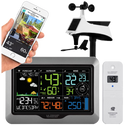
La Crosse Technology V61 Wi-Fi Professional Weather Station
Comprehensive specifications for model V61 / C75716, including the colour weather display, Breeze Pro wind sensor, wireless rain sensor, La Crosse View connectivity and connected AccuWeather forecast functions.
System Overview
| Brand | La Crosse Technology |
|---|---|
| Product type | Wi-Fi professional home weather station with indoor display, outdoor wind, temperature and humidity sensor, and separate wireless rain sensor. |
| Display model | V61 |
| Product number | C75716 |
| Included wind sensor | LTV-WSDTH04 Breeze Pro sensor for wind speed, wind direction, outdoor temperature and outdoor humidity. |
| Included rain sensor | LTV-R3 self-emptying wireless rain sensor. |
| Operating modes |
|
| Measured conditions | Indoor temperature, indoor humidity, outdoor temperature, outdoor humidity, wind speed, wind direction, rainfall and relative atmospheric pressure. |
| Connected forecast data | Hourly and daily forecasts, chance of precipitation, forecast high and low temperatures, expanded forecast icons and a 12-hour precipitation graph supplied through AccuWeather. |
| Mobile platform | La Crosse View app for compatible Apple iOS and Android mobile devices. |
| Extra sensor capacity | Displays data from up to four additional compatible sensors in the Extra Sensor area of the display. Connected sensor data can also appear in the La Crosse View app. |
What Is Included
| V61 weather station display | One indoor colour LCD weather station display with integrated relative-pressure sensor, tabletop stand and wall-placement capability. |
|---|---|
| Breeze Pro sensor | One LTV-WSDTH04 outdoor sensor for wind speed, wind direction, temperature and humidity. |
| Rain sensor | One LTV-R3 wireless self-emptying rainfall sensor. |
| Display power supply | One 5V AC power adapter. |
| Backup battery | One CR2032 coin-cell battery for maintaining the display’s time and date during a power interruption. |
| Wind sensor mounting equipment | Mast, adjustable mounting base, pole adapter, hand screw and supplied mounting screws for the installation methods shown in the setup guide. |
| Documentation | Setup and operating guide. |
| Additional batteries required | Three AA batteries for the Breeze Pro sensor and two AA batteries for the rain sensor. Five AA batteries are required in total. |
Primary Measurement Specifications
| Indoor temperature range | 0°C to 50°C / 32°F to 122°F |
|---|---|
| Indoor humidity range | 10% to 98% RH |
| Outdoor temperature range | -40°C to 60°C / -40°F to 140°F |
| Outdoor humidity range | 10% to 99% RH |
| Wind speed range | 0 to 178 km/h / 0 to 111 mph |
| Wind direction range | Full 360° wind direction measurement. |
| Wind direction display | Selectable degree display or 16-point cardinal and intercardinal direction display. |
| Rainfall range | 0 to 9999 mm / 0 to 393.6 inches |
| Relative pressure range | 800 to 1100 hPa / 23.62 to 32.48 inHg |
| Pressure source | Integrated barometric pressure sensor inside the V61 display. |
| Temperature display units | Selectable Celsius or Fahrenheit. |
| Temperature resolution display | Selectable decimal temperature display or whole-number temperature display. |
| Wind speed units | Selectable kilometres per hour or miles per hour. |
| Rainfall units | Selectable millimetres or inches. |
| Pressure units | Selectable hectopascals or inches of mercury. |
Display and User Interface
| Display type | Colour LCD weather display with separate areas for time and calendar, indoor conditions, outdoor conditions, wind, rainfall, forecast, pressure and extra sensors. |
|---|---|
| Backlight levels | Four selectable brightness levels plus an Off setting. |
| Automatic dimming | Programmable Auto-Dim function automatically changes the display to a selected low-light level at a chosen start hour and returns it to the selected high-light level at a chosen stop hour. |
| Auto-Dim scheduling | The start and stop hours can be programmed. Minute-level scheduling is not provided. |
| Time format | Selectable 12-hour or 24-hour format. |
| 24-hour display behaviour | Seconds are displayed in place of the AM or PM marking when 24-hour time is selected. |
| Calendar information | Year, month, date and weekday. |
| Calendar order | Selectable month/date or date/month display order. |
| Weekday setting | The weekday is calculated automatically after the year, month and date have been entered. |
| Language options | English, Spanish, French and German for supported display instructions, menus and calendar information. |
| Button tone | Selectable beep On or Off. |
| Wi-Fi status display | The SET button displays the current Wi-Fi and weather-service status, including connected, app connection required, weather service unavailable and lost Wi-Fi messages. |
| Placement | Suitable for placement on a desk or countertop using the integrated stand, or wall placement using the rear mounting provision. |
La Crosse View App and Wi-Fi Connectivity
| App | La Crosse View. |
|---|---|
| App functions | Remote monitoring of connected station and sensor readings, device naming, location organisation, connected forecast information and app-based notification alerts. |
| Wi-Fi requirement | 2.4GHz Wi-Fi using 802.11 b/g/n. |
| 5GHz Wi-Fi | The station does not connect directly to a 5GHz-only Wi-Fi network. A compatible 2.4GHz network must be available. |
| Multi-band routers | When used with a compatible multi-band router, the station connects through the 2.4GHz band. |
| Minimum network speed | Greater than 1 Mbps. |
| Network-name limit | The Wi-Fi network name must not exceed 45 characters. |
| Network-password limit | The Wi-Fi password must not exceed 45 characters. |
| Mobile requirements | A compatible Apple iOS or Android mobile device with Wi-Fi or cellular service. |
| Initial setup requirement | The mobile device should be connected to the same 2.4GHz Wi-Fi network being used for the station during setup. |
| Device registration | The display and sensors can be added by scanning their device-ID barcodes or by entering their device IDs manually in the La Crosse View app. |
| Station and Wi-Fi registration | Adding the display to a La Crosse View account and connecting it to Wi-Fi are separate setup stages. |
| WPS connection option | WPS provisioning is supported for compatible routers with a dedicated WPS button. |
| Internet time synchronisation | When connected, the time and date update automatically through the Internet. The station checks the La Crosse View weather server several times each day. |
| App data refresh | Sensor readings in the app generally update approximately every 60 to 90 seconds. |
| Standalone use | Wi-Fi and the app are optional. Core locally measured weather information remains available directly on the display without an Internet connection. |
| Settings control | Language, measurement units and other display settings are adjusted directly through the station’s Settings menu rather than through the app. |
Forecast Functions
| Standalone forecast method | Uses changes in locally measured barometric pressure to predict upcoming weather. |
|---|---|
| Standalone forecast icons | Sunny, partly sunny, cloudy, rain, thunderstorm and snow. |
| Connected forecast provider | AccuWeather. |
| Connected hourly forecast | Up to 12 hourly forecast periods can be viewed from the station. |
| Connected daily forecast | Up to seven daily forecast periods can be viewed from the station. |
| Connected forecast icons | Sunny, partly sunny, cloudy, light rain, rain, thunderstorm, light snow, snow, wintry mix, windy, ice and fog. |
| Connected precipitation probability | Chance-of-precipitation information is supplied through AccuWeather when the station is connected. |
| Connected forecast high and low | Daily forecast high and low temperatures are supplied through AccuWeather when connected. |
| Standalone high and low display | When used without Wi-Fi, the high and low area displays locally recorded outdoor temperature history instead of Internet forecast values. |
| Standalone precipitation area | When used without Wi-Fi, the precipitation area displays the locally measured 24-hour rainfall total. |
| Precipitation graph horizon | Connected forecast graph represents expected rain or snowfall over the next 12 hours. |
| Precipitation graph levels |
|
| Forecast auto-scroll | Holding the FORECAST button scrolls through available hourly and daily connected forecast information. |
| Forecast interpretation | Forecast icons represent predicted upcoming weather and may not match the weather occurring at the station at that exact moment. |
Moon Phase Display
| Moon phase calculation | Calculated from the date programmed into the station. |
|---|---|
| Moon display period | The moon phase appears in the forecast area from 7:00pm to 6:59am. |
| Daytime forecast display | Outside the moon-display period, the sun symbol is shown only when the forecast is sunny or partly sunny. |
| Displayed moon stages | New moon, small waxing crescent, large waxing crescent, first quarter, small waxing gibbous, large waxing gibbous, full moon, large waning gibbous, small waning gibbous, last quarter, large waning crescent and small waning crescent. |
Wind Measurement and Wind History
| Wind speed source | LTV-WSDTH04 Breeze Pro sensor. |
|---|---|
| Current wind speed | Displays the highest wind speed measured during the preceding 31-second sensor cycle. |
| Wind sampling | The Breeze Pro sensor samples wind approximately every three seconds during each 31-second reporting cycle. |
| Top wind speed | Displays the highest wind speed recorded during the preceding 60 minutes. |
| Current wind direction | Selectable compass letters or degrees. |
| Prevailing wind direction | Displays the prevailing direction measured over the preceding hour. |
| Wind data-source indicators | On-screen icons identify whether displayed wind-direction information is coming from the Breeze Pro sensor, an Internet weather source or a compatible add-on sensor. |
| Wind speed graph | Colour-segmented graphical representation of wind speed, covering 16 indicated speed bands from approximately 2 km/h to above 40 km/h. |
| Wind cup animation | The on-screen wind cups animate more rapidly when wind speed exceeds approximately 8 km/h / 5 mph. |
| Wind reception indicator | Displays whether the station is receiving wind sensor transmissions. |
| One-hour history | Top wind speed measured during the preceding 60 minutes. |
| 24-hour wind history | Highest wind speed from the rolling preceding 24-hour period. This is not limited to the current calendar day. |
| Seven-day wind history | Highest wind speed from the rolling preceding seven-day period. |
| Monthly wind history | Highest wind speed recorded during the selected calendar month. Previous monthly records can be reviewed for up to 11 earlier months. |
| Yearly wind history | Highest wind speed recorded during the current calendar year. |
| Wind record timestamps | Wind history records are displayed with their associated time and date information where supported. |
| Wind history reset | Individual displayed wind history values can be reset without resetting every station record. |
Temperature, Humidity, Feels Like and Dew Point
| Indoor temperature | Measured by the V61 station display. |
|---|---|
| Indoor humidity | Measured by the V61 station display. |
| Outdoor temperature | Normally measured by the included Breeze Pro sensor. A compatible add-on temperature and humidity sensor can be configured to supply the outdoor temperature reading instead. |
| Outdoor humidity | Normally measured by the included Breeze Pro sensor. A compatible add-on temperature and humidity sensor can be configured to supply the outdoor humidity reading instead. |
| Outdoor high temperature | Recorded with time and date of occurrence. |
| Outdoor low temperature | Recorded with time and date of occurrence. |
| Outdoor high humidity | Recorded with time and date of occurrence. |
| Outdoor low humidity | Recorded with time and date of occurrence. |
| Indoor high temperature | Recorded with time and date of occurrence. |
| Indoor low temperature | Recorded with time and date of occurrence. |
| Indoor high humidity | Recorded with time and date of occurrence. |
| Indoor low humidity | Recorded with time and date of occurrence. |
| Feels Like high | Highest calculated Feels Like temperature record. |
| Feels Like low | Lowest calculated Feels Like temperature record. |
| Wind chill calculation | Used when outdoor temperature is below 10°C / 50°F and sustained wind speed is at least approximately 8 km/h / 5 mph. |
| Heat index calculation | Used when outdoor temperature is above approximately 26.7°C / 80°F. |
| Moderate-temperature behaviour | Between approximately 10°C and 26.7°C / 50°F and 80°F, the Feels Like reading remains the same as the current outdoor temperature regardless of wind speed or humidity. |
| Dew point | Calculated dew-point temperature is available in the temperature history sequence. The dew-point reading does not include a time and date stamp. |
| Record reset | Each displayed temperature or humidity high or low record can be reset individually to the current measured value. |
Rainfall Measurement and Rain History
| Rainfall source | LTV-R3 wireless tipping-rocker rain sensor. |
|---|---|
| One-hour rainfall | Running rainfall total for the preceding 60 minutes. |
| 24-hour rainfall | Running accumulated rainfall total for the preceding 24 hours, updated at the top of each hour. |
| Seven-day rainfall | Total of the preceding seven consecutive 24-hour rainfall readings. The value updates at midnight and is not limited to a Monday-to-Sunday week. |
| Monthly rainfall | Accumulated rainfall for the current calendar month. The value resets at the beginning of each new calendar month. |
| Yearly rainfall | Total of the current month plus the previous 11 monthly rainfall totals. |
| Previous monthly rainfall | The current month and up to 11 previous monthly rainfall totals can be reviewed. |
| Total rainfall | Total accumulated rainfall since the station was powered on or since the total was last manually reset. |
| Rain auto-scroll | Automatically rotates through rainfall readings at approximately five-second intervals. |
| Individual rain-record reset | The displayed rainfall period can be reset individually without clearing every rainfall record. |
| Days Since Last Rain | After 24 hours without measurable rainfall, the station begins counting the number of days since the last recorded rain event. |
| New-rain behaviour | When new rainfall begins, the display automatically returns from Days Since Last Rain to the last rainfall measurement period that was being viewed. |
| Rain sensor reporting | The sensor checks for rainfall changes approximately every 45 seconds. |
| Rainfall-change transmission | A change of approximately 0.2 mm is sufficient to trigger a new rainfall transmission. |
| No-rain transmission interval | When rainfall is not changing, the sensor transmits approximately every three minutes to conserve battery power. |
| Self-emptying design | Drainage openings in the base allow measured water to leave the sensor automatically. |
| Snowfall measurement | The sensor does not directly or accurately measure snowfall. Melted snow entering the sensor may subsequently be counted as rainfall. |
Relative Pressure and Pressure Tendency
| Pressure type | Relative atmospheric pressure. |
|---|---|
| Default pressure value | 1013 hPa / 29.91 inHg. |
| Automatic calibration | The station can acclimate automatically when a local pressure value is not manually entered. Automatic calibration may take up to approximately 10 days. |
| Manual calibration | A known local relative-pressure value can be entered through the station’s Settings menu. |
| Pressure tendency indicator | A filled arrow shows the active pressure trend calculated over the preceding three hours. |
| Rapid pressure increase | Pressure has risen by more than approximately 2 hPa during the preceding three hours. |
| Slow pressure increase | Pressure has risen by approximately 1 to 2 hPa during the preceding three hours. |
| Steady pressure | Pressure has varied within approximately -1 hPa to +1 hPa during the preceding three hours. |
| Slow pressure decrease | Pressure has fallen by approximately 1 to 2 hPa during the preceding three hours. |
| Rapid pressure decrease | Pressure has fallen by more than approximately 2 hPa during the preceding three hours. |
Customisable Station Alerts
| Default alert state | All station alerts are Off by default and must be activated individually. |
|---|---|
| High wind speed alert | Selectable high wind speed threshold. |
| 24-hour rainfall alert | Selectable 24-hour accumulated rainfall threshold. |
| Outdoor temperature alerts | Separate high and low outdoor temperature thresholds. |
| Outdoor humidity alerts | Separate high and low outdoor humidity thresholds. |
| Indoor temperature alerts | Separate high and low indoor temperature thresholds. |
| Indoor humidity alerts | Separate high and low indoor humidity thresholds. |
| Alert indication | When a selected value reaches its alert threshold, the corresponding alert icon and value flash on the display. |
| Alert sound | The display sounds five beeps each minute while the reading remains in the alert range. |
| Silencing an alert | Pressing any station button stops the audible alert. The alert icon continues flashing until the measured value moves outside the alert range. |
| Station and app alerts | Alerts programmed directly on the station are separate from notification alerts created in the La Crosse View app. |
Wireless Sensor Communication
| Sensor radio frequency | 915MHz wireless sensor transmission. |
|---|---|
| Maximum stated range | Up to 121.92 metres / 400 feet in open air between each sensor and the station. |
| Range measurement condition | The stated maximum is an open-air line-of-sight figure. Walls, windows, vegetation, concrete, stucco, metal objects and nearby electronic equipment may reduce the effective range. |
| Breeze Pro update interval | Approximately every 31 seconds. |
| Rain sensor update interval | Checks for rainfall changes approximately every 45 seconds. |
| Display update behaviour | The station display updates when it receives a new transmission from the relevant sensor. |
| Initial sensor connection | After initial power-up, the station searches for the included sensors. Connection may take up to approximately 10 minutes. |
| Initial setup distance | For initial pairing, the display and sensors should be positioned close together before the sensors are permanently mounted. |
| Lost sensor indication | If communication is lost for an extended period, the corresponding reading may be replaced by dashes until communication is restored. |
Additional Sensor Support
| Maximum additional sensors | Up to four compatible additional sensors can be displayed through the Extra Sensor area. |
|---|---|
| App connection | Compatible additional sensors may also be added to and viewed through the La Crosse View app when the station is connected. |
| Extra sensor display area | Additional sensor information appears in the dark-blue Extra Sensor area of the V61 display. |
| Extra sensor auto-scroll | The station can automatically rotate through connected extra-sensor readings. |
| Temperature and humidity add-on | A compatible separate thermo-hygro sensor can be used as an additional reading source or configured to replace the outdoor temperature and humidity supplied by the Breeze Pro sensor. |
| Water-leak sensor support | Compatible water-leak sensors can provide leak detection and ambient temperature information. |
| Other compatible categories | Compatible La Crosse add-on options may include thermo-hygro, water-leak, pool and cooking or barbecue sensors, depending on current sensor availability and compatibility. |
| Extra sensor identification | The station can display connected sensor IDs and sensor types for identification and management. |
| Sensor deletion | Individual extra sensors can be removed from the station without performing a full factory reset. |
Button Functions
| ALERTS button | Hold to enter Alert Settings. Press to confirm the selected value and move to the next alert. The plus and minus buttons activate, deactivate or adjust the selected alert. |
|---|---|
| WIND button | Press to cycle through wind-speed history records. While viewing a record, hold the minus button to reset that individual wind value. Holding WIND can initiate a search for the wind sensor. |
| SET button | Press to view Wi-Fi status. Hold to enter the station Settings menu. |
| PLUS and MINUS buttons | Adjust setting values. Holding a button accelerates value adjustment. The minus button is also used to reset selected history values or delete selected sensor IDs. |
| EXTRA SENSOR button | Press to view station and extra-sensor IDs or cycle through extra-sensor information. Hold to place the station in extra-sensor search mode. |
| TEMP button | Press to cycle through temperature, humidity, Feels Like and dew-point records. Hold to search for a compatible temperature and humidity sensor. Hold the minus button while viewing a record to reset it. |
| RAIN button | Press to cycle through rainfall periods and Rain Auto-Scroll. Hold to search for the rain sensor. Hold the minus button while viewing a rainfall value to reset that individual value. |
| FORECAST button | When connected, press to view 12 hourly and seven daily forecasts. Hold to scroll automatically through the available forecast periods. |
| LIGHT button | Press to cycle through the display brightness levels and Off setting. Hold to enter the Auto-Dim setup menu. |
| WIFI button | Used during initial Wi-Fi configuration. Holding the button clears stored network credentials and returns the station to Wi-Fi configuration mode. |
| WPS shortcut | Holding SET and MINUS initiates WPS provisioning for a compatible router. |
| Factory reset | Holding ALERTS and RAIN together until the display beeps restarts the station and resets stored sensor and Wi-Fi settings. |
Power Requirements
| Display primary power | 5V AC power adapter, included. |
|---|---|
| Display backup battery | One CR2032 coin-cell battery, included. |
| Backup battery purpose | Maintains the time and date during a temporary mains-power interruption. |
| Battery-only display operation | The CR2032 is not intended to provide normal full display, sensor-update or connected Wi-Fi operation. The 5V adapter is required for normal use. |
| Breeze Pro sensor power | Three AA batteries. |
| Rain sensor power | Two AA batteries. |
| Total AA batteries required | Five AA batteries. |
| Breeze Pro solar panel | The integrated solar panel helps optimise battery life but does not replace the three required AA batteries. |
| Low-battery indicators | Separate battery indicators identify when the display backup battery, Breeze Pro sensor batteries, rain sensor batteries or compatible extra-sensor batteries require replacement. |
Physical Dimensions
| V61 display dimensions | 21.09 cm long × 2.88 cm deep × 16.09 cm high / 8.30 × 1.13 × 6.33 inches. |
|---|---|
| Breeze Pro with bracket | 34.0 cm long × 19.8 cm wide × 24.6 cm high / 13.39 × 7.80 × 9.69 inches. |
| Breeze Pro without bracket | 23.8 cm long × 19.8 cm wide × 17.7 cm high / 9.37 × 7.80 × 6.97 inches. |
| Rain sensor dimensions | 18.2 cm long × 13.3 cm wide × 12.0 cm high / 7.16 × 5.24 × 4.72 inches. |
| Maximum mounting pole diameter | Approximately 25.4 mm / 1 inch when using the supplied Breeze Pro pole adapter. |
Breeze Pro Sensor Mounting Requirements
| Sensor orientation | Install upright with the wind cups above the sensor body. |
|---|---|
| Levelling | The sensor and mounting mast should be installed level. |
| Solar-panel direction | The manufacturer specifies that the solar-panel side should face south for the intended wind-direction alignment and battery-support function. |
| Preferred mounting position | Mount on the tallest practical object in the immediate area, clear of rooflines, eaves, trees and other structures that obstruct or redirect airflow. |
| Obstruction clearance | For more representative wind measurements, the sensor should be mounted well above nearby objects rather than directly beside or below them. |
| Ground-level mounting | Fence posts, decks, poles and similar locations can provide useful local readings, but wind measurements may differ from official reporting stations because of nearby obstructions. |
| Flat-surface mounting | The supplied adjustable base can be fixed to a suitable flat surface using the supplied screws. |
| Pole mounting | The supplied pole adapter can attach to a compatible cylindrical conduit up to approximately 25.4 mm in diameter. |
| Optional mounting methods | Tripod, wall, eave-cross and chimney mounting arrangements may be possible with suitable additional equipment. |
| U-bolts | U-bolts may be used with suitable installations but are not part of the standard mounting equipment described in the guide. |
| Fastener inspection | Mounting bracket screws, wind cup fasteners, wind vane fasteners and battery-compartment fasteners should be securely tightened before operation. |
Rain Sensor Placement and Care
| Mounting position | Install horizontally on a stable, level surface. |
|---|---|
| Recommended height | More than approximately 91.4 cm / 3 feet above ground. |
| Exposure | Position in an open area where rainfall can enter freely without obstruction from roofs, trees or surrounding structures. |
| Base position | Do not install the sensor in a depression that can restrict drainage or expose it to standing water. |
| Drainage | The base contains drainage holes that allow the sensor to empty itself after measuring rainfall. |
| Funnel cleaning | Periodically remove leaves, grass and other debris from the removable funnel. |
| Internal cleaning | Inspect the internal rocker for dirt, insects or debris that could restrict its movement. |
| Funnel removal | Side locking tabs release the funnel so the funnel and internal measuring area can be cleaned separately. |
| Winter use | The rain sensor is designed for outdoor use and can remain outside in temperatures below freezing. |
| Winter storage alternatives | The sensor may be left outside, covered, or brought indoors with its batteries removed. Direct snowfall is not accurately measured. |
Important Operating Information
| Continuous display power | The supplied 5V power adapter is required for normal display operation, ongoing wireless sensor updates and connected Wi-Fi functions. |
|---|---|
| Coin-cell battery limitation | The CR2032 battery is a time-and-date backup and is not a substitute for the AC adapter. |
| Wi-Fi limitation | A compatible 2.4GHz Wi-Fi network is required for La Crosse View and AccuWeather functions. |
| Internet-dependent features | Hourly and daily forecasts, chance of precipitation, forecast high and low temperatures, Internet time updates and remote app access depend on a working Internet connection and connected services. |
| Standalone forecast limitation | Without Wi-Fi, the forecast is generated from local pressure trends and does not include the expanded AccuWeather forecast service. |
| Wireless range | The 121.92-metre / 400-foot specification is an open-air maximum. Actual range may be substantially lower inside buildings or around metal, concrete, dense vegetation and electronic interference. |
| Wind-data comparison | Wind readings may differ from nearby weather reports because official stations can be many kilometres away and may use higher, less-obstructed mounting locations. |
| Rainfall comparison | Rainfall can vary across a relatively small area. Differences from another weather station do not necessarily indicate a sensor fault. |
| Forecast interpretation | Forecast symbols describe expected upcoming conditions and should not be treated as a direct description of the weather occurring at the display at that moment. |
| Button-cell safety | The product contains a CR2032 button battery. Keep new and used button batteries out of reach of children. Swallowing or inserting a button battery can cause severe internal injury and requires immediate emergency medical attention. |
| Battery selection | Use correctly sized batteries of the same type and condition. Do not mix old and new batteries or mix alkaline, lithium, standard and rechargeable batteries within the same device. |
Warranty
| Manufacturer warranty | One-year limited warranty from the date of purchase against qualifying manufacturing defects in materials and workmanship, subject to the manufacturer’s warranty conditions. |
|---|